Wednesday, October 11, 2006

Benq Siemens Black Box Concept

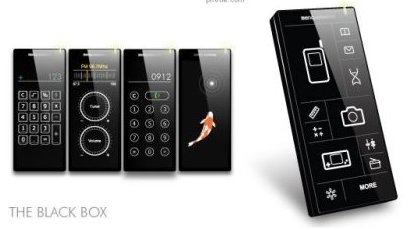
BenQ is still making phones in Asia, just no longer in the German market. This is one of the concept phones being worked on—the Black Box.

No keypads, no buttons, just a big ass touchscreen. From the initial pictures it looks like the interface changes on the fly.

I'm digging the black minimalist design overall. It will probably never see the light of day as an actual product, but it is still cool to look at, nonetheless. – Travis Hudson
source: gizmodo.com

Labels: ,

blogmarksdeliciousdiggfurlgooglenetvouznewsvineredditspurlTechnorati


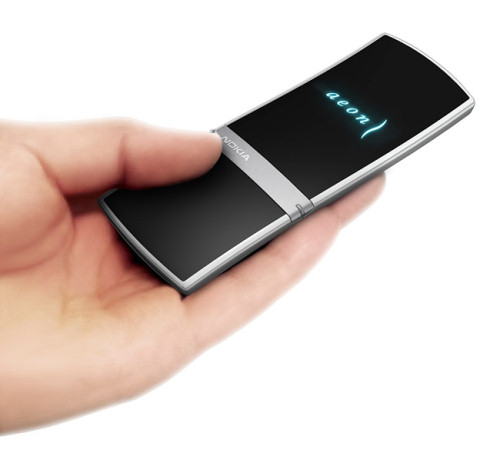
Nokia AEON: another concept with the touchscreen control

Nokia has posted the image of another mobile phone concept called Nokia AEON. Looking at the photos we guess that the model is peculiar for its front panel, which is almost sensor.

The interface of the concept is similar to another concept BenQ-Siemens Black Box, which displays control elements and menu depending on the current function. In any case the model looks very attractive.

Labels: ,

blogmarksdeliciousdiggfurlgooglenetvouznewsvineredditspurlTechnorati


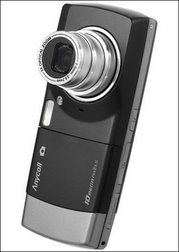
Samsung world's first 10 megapixel camera phone


South Korea's Samsung Electronics has started selling what it claims is the world's first 10 megapixel multimedia phone that offers crisp video and top-notch digital camera functions.

"Samsung reinforces its technology leadership by launching the world's first 10 megapixel mobile phone ... in the Korean market," the company said in a statement.

The newest addition to its line of multimedia phones is six millimetres (0.24 inches) thinner and 10 grams (0.35 ounces) lighter than the existing seven megapixel camera handset.

It sets itself apart from its previous megapixel camera phones by combining mobile TV capability at satellite standard, the company said.
It also offers the same level of picture-taking sophistication that a top-notch megapixel digital camera offers.
The front is designed as a bar-type mobile phone, while the back comes with a design reminiscent of a real digital camera.

It will sell for around 900,000 won (937 dollars) in the South Korean market.
source: news.yahoo.com

Labels: ,

blogmarksdeliciousdiggfurlgooglenetvouznewsvineredditspurlTechnorati


Saturday, October 07, 2006

I/O Brush

Labels: ,

blogmarksdeliciousdiggfurlgooglenetvouznewsvineredditspurlTechnorati


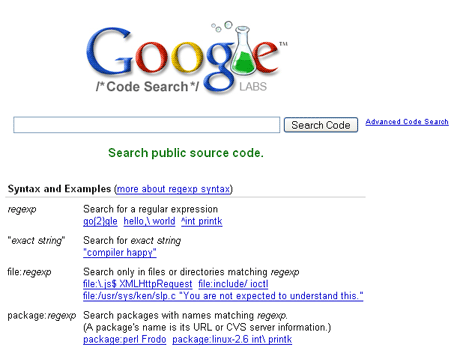
Google Code Search


Code search is a great resource for web developers and programmers, but like the making available of all previously unsearched bodies of information, it's given lots of flashlights to people interested in exploring dark corners.

Labels:

blogmarksdeliciousdiggfurlgooglenetvouznewsvineredditspurlTechnorati


Friday, October 06, 2006

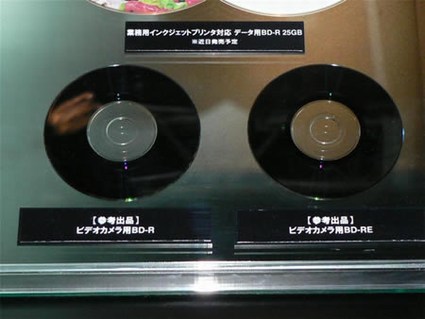
TDK unveils 16.5GB mini Blu-ray discs at CEATEC

If you think those 50GB Blu-ray blanks are asking a bit much from the ole wallet, and haven't found a Blu-ray burner without all sorts of issues to begin with, TDK is moving forward anyway with its latest twist on Blu-ray technology.

It's only fitting that the same folks bringing us the 200GB variety have announced their plans to drop a smaller, more compact version, and that's precisely what happened at today's CEATEC festivities.

The 8-centimeter recordable disc handles 16.5GB on a single layer, and is being designed for next generation camcorders, such as the ones Hitachi's been showing off at the same show. Although nothing definitive has been said, the groundwork has apparently been laid for a dual-layer variety (that's 33GB for those still counting) to hit shelves in the even-more-distant future.
source: engadget.com

Labels: ,

blogmarksdeliciousdiggfurlgooglenetvouznewsvineredditspurlTechnorati


Wednesday, October 04, 2006

Nokia introduces a new radio technology – Wibree

Nokia Research Center celebrated yesterday its 20th anniversary. In addition to the event Nokia has introduced Wibree wireless technology. Wibree technology complements close range communication with Bluetooth like performance within 10 m range and data rate of 1 Mbps.

Wibree isn’t considered to be the direct competitor of Bluetooth. It is optimized for applications requiring extremely low power consumption, small size and low cost. Wibree is the first open technology offering connectivity between mobile devices or PC, and small, button cell battery power devices such as watches, wireless keyboards, toys and sports sensors.
The new standard is easily integrated with Bluetooth. Wibree is implemented either as stand-alone chip or as Bluetooth-Wibree dual-mode chip. The small devices like watches and sports sensors will be based on stand-alone chip whereas Bluetooth devices will take benefit of the dual-mode solution.

The specifications of Wibree are developed by Nokia in cooperation with several large chip makers. The first commercial version is expected to be introduced in 2Q 2007, and the first shipments of chips will start during 2Q 2007.

Labels:

blogmarksdeliciousdiggfurlgooglenetvouznewsvineredditspurlTechnorati


Wednesday, September 27, 2006

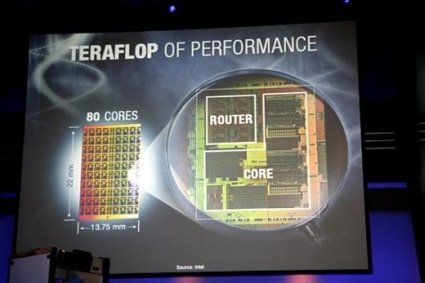
Intel Set to Introduce 80 Core Processors in Five Years Time


Intel displayed prototype of a processor with 80 cores that can perform a trillion floating point operations per second and can exchange data at a terabyte a second.

This development looks very interesting and promising but I am yet to imagine how these chips are expected to be successful when there are not many applications to advantage of so many cores. Many applications as of today still do not take the advantage of the present mainstream dual core processors let us hope at the end of five years we applications that take advantage of these chips immense processing potential.

Labels:

blogmarksdeliciousdiggfurlgooglenetvouznewsvineredditspurlTechnorati


Wednesday, September 20, 2006

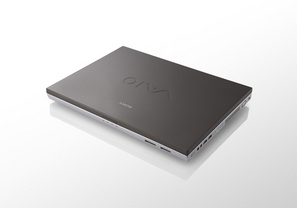
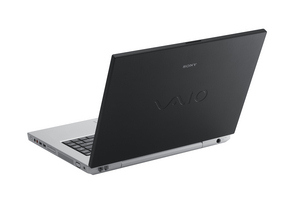
Sony introduces chic notebooks for your home


Designed to complement any home's motif, Sony unveiled the VAIO N Series notebook computer line featuring cool colors, smooth lines and a simple sense of style for people who want to balance form with function.

Available in three colors: Wenge brown -a creamy, coffee-color made to resemble wood furniture; black for an elegant contemporary look; and white for a light, airy feeling, the VAIO N Series is designed to reflect different lifestyles and home decors.

Mike Abary the vice president of VAIO product marketing for Sony Electronics said:
"From the furniture you sit on to the artwork you hang on your walls, you coordinate every aspect of your home's style so why hide your PC?"

"These new notebooks are designed to accent your interior design, as well as your life."

Some N series notebooks are based on Intel Core Duo processors. They are equipped with 15.4” widescreen LCD, up to 2 GB DDR2 RAM, capacious HDD, multi-format DVD, card readers for Memory Stick PRO and Memory Stick PRO Duo. There is the support of Wi-Fi (802.11 a/b/g) wireless networks. Dimensions are 365.7x266.7x30.5-40.6 mm and weight – 3 kg.

The series is expected in shops early in October for about $1000 depending on the configuration.

Source: Helpero

Labels:

blogmarksdeliciousdiggfurlgooglenetvouznewsvineredditspurlTechnorati


Tuesday, September 12, 2006

Gmail vs. Windows Live Mail vs. Yahoo Mail betas


Which Web-based e-mail service should you use? It depends on your personal taste, of course, but a clean page layout, speed, and security are paramount. We tested: Gmail vs. Windows Live Mail vs. Yahoo Mail betas.

Gmail beta by Google
Every once in a while, a product breaks the mold set by others in the category and forces those established products to improve in order to compete. Google did it with its Internet search engine, and is set to do it yet again—we hope—with its free Web e-mail service, Gmail by Google.

What i like:
*Speed. We found Gmail to be the fastest online e-mail service; our messages seemed to appear the instant we clicked on a header.
*The gigantic 2.5GB of storage per user—that's roughly 1,000,000 pages of text—blows away Windows Live mail(2GB) and Yahoo! Mail (1GB).
*The interface is very simple, quick and easy to use.
*E-mail thread view.
*Keyboard shortcuts.

What I did not like:
*Gmail scans your messages and serves up targeted text-based ads based on their content. That has a lot or privacy advocates up in arms, and may be too Orwellian for some users.
*There is no virus filter (though you can automatically block certain file extensions, such as EXE) . *There is no way to white-list addresses in the spam filter.
*The contacts management in Gmail is also primitive at this stage compared with Yahoo! Mail's more advanced address book.

Summary:
As it did with Internet searching, Google is looking to raise the bar in the Web e-mail category with its Gmail service. A very quick, responsive service with a simple interface, bellying a more complex, useful online email client.
Helpero rating 9/10

Yahoo! Mail beta
The original Yahoo Mail web-based client is now looking somewhat dated compared to offer newer offerings.The new beta is the most impressive out of the three products being examined here. The interface is very clear, easy to use, very quick to respond and is more reminiscent of a fully fledged desktop client than a browser-based utility.

What i like:
*Yahoo! Mail scans for spam and viruses effectively.
*A WYSIWYG HTML editor lets you compose rich emails easily in Yahoo! Mail.
*Yahoo! Mail offers 1 GB of storage for free.
*The multi-tab viewing window that allows, for example, your inbox coupled with a preview panel or a newly invoked tab displaying an individual email, is easily one of the best interfaces for web-mail I’ve used to date.

What I did not like:
*Big banner ads.
*Limited antispam controls.
*Yahoo! Mail does not thread messages, lacks virtual folders and clever searching

Summary:
Excellent functionality, competently able to replace your desktop mail client on Firefox or Internet Explorer.
Helpero rating 8/10

Windows Live Mail beta
Much like the ongoing renovation of Yahoo! Mail, MSN Hotmail is getting a face-lift that makes it resemble a desktop e-mail client. The code name for this work in progress is Kahuna, and it promises big changes for its tens of millions of users.

What i like:
*The look and feel of Kahuna is radically different from that of the current Hotmail, with an interface divided into three columns similar to the three-pane work space of Microsoft Outlook and Yahoo Mail Beta.
*Security. So far we prefer Windows Live Mail's approach to spam and other threats
*Keyboard shortcuts. Let you send and manage messages without relying on the mouse.
*Organizing content. By allowing you to drag and drop messages into folders, Yahoo and Windows Live spare you the manual labor of using a tiny check box to move content around.

What I did not like:
*The Ajax-based requests seem to be slower than either of the other two sites.
*Getting used to the new layout may be hard for die-hard fans of Hotmail.

Summary:
If you're using Web-based email and are looking for the best experience, keep your eye on Windows Live Mail. This is one fish that you just might want to land.
Helpero rating 5/10

Conclusions:
If you're a longtime user of Yahoo or Hotmail, these upgrades may seem heaven-sent and intuitive. This is especially true if you're already accustomed to Outlook or Eudora's multipane layouts, which let you organize messages by dragging and dropping them into folders. But all this dragging and dropping seems primitive next to Gmail's automated labeling options. I give the Web 2.0 edge to Gmail for thinking outside the box. Gmail's integration with Google Calendar, Chat, and Maps feels logical and not forced, and if there have to be ads on the page, I prefer Google's text messages off to the side over banner ads any day. Furthermore, true to the Web 2.0 spirit of sharing, Gmail's open code enables devotees to hack new features.

written by Florin C.
Source: Helpero

Labels:

blogmarksdeliciousdiggfurlgooglenetvouznewsvineredditspurlTechnorati


UBUNTU vs. SUSE vs. FEDORA


According to the Linux watching web site, DistroWatch, there are more than 400 Linux and BSD distributions currently available and active. Many of these exist with many versions, giving thousands of possible options to choose from.
The question often arises "Which one is the best?". As with many simple questions, it does not have a simple answer. Typically, if you ask five random Linux users, you will get five different and conflicting answers.

Top three distributions are:
1. UBUNTU / 2. SUSE / 3. FEDORA


1. UBUNTU

The actual installation was smooth, easy and provided an excellent desktop for a user who is new to Linux. Someone who wanted only basic options.
What I liked:
Simplicity: Give the user what they need, no more unless they want to add that themselves. Good idea!
Easy Install: Ok a distribution has to be easy for the user to install and one CD is about as easy as it gets. The steps of installation are quick effective and to the point. The network setup worked fine in the install!

I loaded the distro on a AMD desktop and a Fujitsu Siemens Amilo laptop and they both loaded with no problems. Detection of the laptop screen was flawless. Power Saving features worked with no problems.
USB Detection: My conclusion is that some of the cheap, USB1 drives will not work without some configuration changes, but the better USB2 drives will autodetect.
Network Tools: Gnome now offers a handy tool to use for networks. It is actually 8 tools in one interface. The tools are Devices,Ping, Netstat,Traceroute, Port Scan, Lookup, Finger and Whois. These are certainly handy tools and they are easy to use in the graphical interface.
What I did not Like:
My biggest complaint by far... no functional firewall exists on the system. I went to the website and found that the concept of the designers is that since you are not using a daemon by default so you do not need a firewall. PLEEEASE...don't let our Linux future put at risk security and force us all to return the constant hacks and fixes we all hated in Windows. Security is important and the system does need a simple to install firewall.

Here is a quick way to setup a firewall with apt-get.

Multimedia Limitations: By default you will find limited resources for multimedia. Most users will find themselves searching for new options in this area.

Summary:
If you are looking for a simple distribution, you are a new user with modest requirements and you will make sure you load a simple firewall...take a look at Ubuntu. For a home user that needs basics it is a good choice.

2. SUSE

I have used Suse exclusively on my laptops, I always have at least two.
Each new distribution brings new features and more stability.

What I liked:
YAST: is a great tool for the administrator to configure the system. I would suggest that it is probably the easiest tool to configure a system that is available. It is intuitive, powerful and effective.

The Desktop: My personal option is that first impressions on the Desktop is one of the most important aspects of how new users feel about Linux. SUSE has the best initial feel of any distributions that I have seen.

USB Recognition: Now when you insert a flash drive it automatically recognizes the drive and functions on it's own, just like Windows.

What I did not Like:
I need ssh to work flawlessly. Once the configuration was setup and the firewall was setup like it was supposed to...no ssh. The firewall configuration did not allow any connections. YAST seemingly failed me. All that said, beware of little problems with the firewall.
Summary:
The best way I would describe SUSE professional is options. I guess that is why I like SUSE for a desktop is that it provides so much real functionality. If you are into multimedia you should try SUSE because there are so many multimeda options.

3. FEDORA

I have used every Fedora distribution as a desktop and put them through the paces, Fedora is the first one that I have felt that was stable, full featured and a candidate to keep on my desktop.
What I liked:
Nautilus seemed stable and has the same basic features as before. I really appreciate the fact that the images within Nautilus can be set up to be thumbnails of the actual image.
Gnome is stable and adds new features to removable devices and network servers.
Up2date was fast and worked beyond my expectations.
Network Tools is a wonderful addition to Fedora. It brings eight tools together in one interface for easy use for any network administrator.
What I did not Like:
Multimedia: Fedora will not provide support for non-open source components like Real Player. I can understand keeping things open source, but this fact is a major drawback for many multimedia consumers. Anyway, the Helix Player is easy to use and works well.

Summary:
Fedora is actually a solid well thought out desktop operating system with good security, applications and overall feel. If you can deal with the limited multimedia options or if you load your own, this is a great system.

Conclusions: I strongly feel, that the best Linux distribution is the one that you like the most. I personally like Ubuntu best: I find it easiest to use. My first distro was Fedora (Red Hat) and I found it hard going on my own.
Ubuntu is a desktop distribution based on Debian. At a technical level they are very similar, but Ubuntu has a simplified installer and a strong desktop focus.
Remember that unlike proprietary operating systems, it is usually very easy to switch from one distribution to another one, if you feel like a change.

written by Florin C.
Source: Helpero

Labels:

blogmarksdeliciousdiggfurlgooglenetvouznewsvineredditspurlTechnorati